
Advanced Voice
Feature Access Codes
You can use the following star codes to enable and disable features from your handset instead of logging into the phone management portal.
| Feature | Enable / Use | Disable |
|---|---|---|
| Anonymous Call Rejection | *77 | *87 |
| Call Forwarding – Always | *72 | *73 |
| Call Forwarding – Busy | *90 | *91 |
| Call FOrwarding – No Answer | *92 | *93 |
| Call Forwarding – Not Reachable | *94 | *95 |
| Call Return | *69 | |
| Call Waiting | *56 | *57 |
| Call Waiting – Per Call | *70 | |
| Call Waiting – Disable (Per Call) | *70 | |
| Caller ID Block – Outbound | *68 | *81 |
| Caller ID Block (Per Call) | *67 | |
| Clear Voice Message Indicator | *99 | |
| Do Not Disturb | *78 | *79 |
| Flash Call Hold | *22 | |
| Last Number Redial | *66 | |
| Speed Dial – 8 | *74 | |
| Speed Dial – 100 | *75 | |
| Voicemail | *98 or *62 |
Stopping Unwanted Calls
Stopping unwanted calls requires a multi-prong approach, that starts with the carrier! Our fully implemented STIR/SHAKEN protocol which authenticates and verifies the caller identity at the network level and significantly reduces spoofed and unverified traffic. Unverified traffic is where the majority of these unwanted calls come from. Here are some tips to narrow down those remaining calls:
National Do Not Call Registry
Register your number with the National Do Not Call Registry at https://www.donotcall.gov. This database is managed by the FTC who is responsible for protecting and enforcing these rules. After registering your number, companies have 31 days to remove you from their contact lists. This works for both cell phones and land lines.
The Do Not Call registry stops unwanted sales calls from real companies that follow the law. This won’t stop companies you’ve recently done business with from calling you, but if you ask them to stop calling you – they have to stop. Be sure to document the date that you asked them to stop.
The Do Not Call Registry will not stop political calls, charitable calls, debt collectors, informational calls, or surveys. These calls cannot include a sales pitch.
Selective Call Rejection
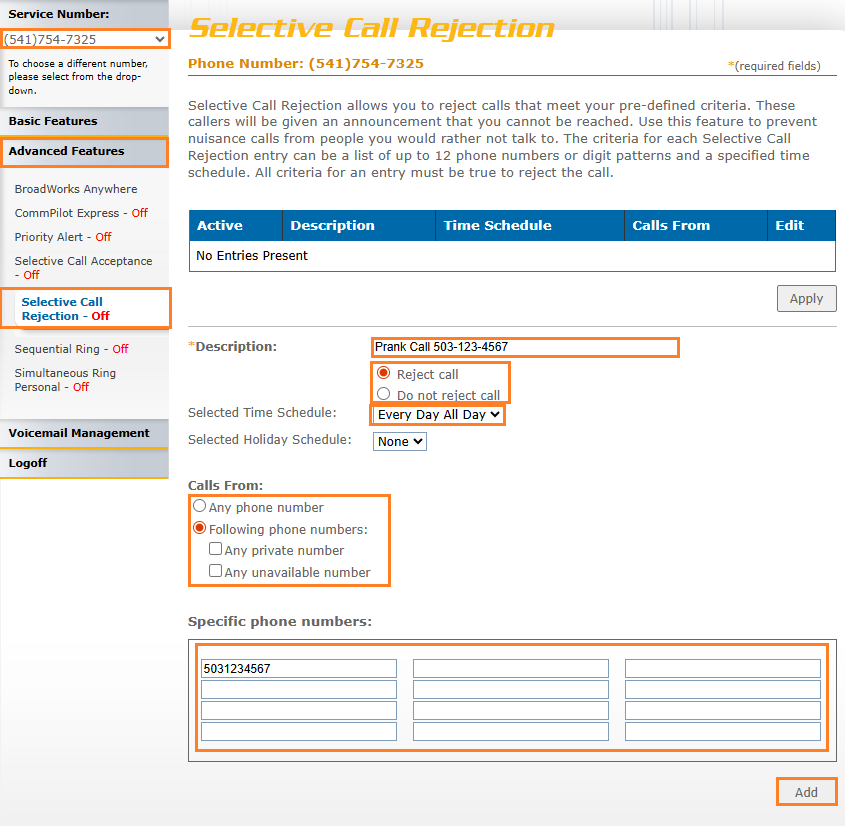
Our Advanced Voice includes Selective Call Rejection at no additional charge! Add a number to this list to prevent them from calling you again!
-
-
- Log into the Residential Phone Portal.
- If you have multiple lines, make sure that the correct line is selected from the Service Number drop-down menu.
- Select Advanced Features from the menu on the left to reveal options and select Selective Call Rejection from those options.
- Enter a name for the rule in the Description field, this can be anything you want it to be.
- Specify if you want the call rejected or not when criteria is met.
- Set the Time Schedule for this rule. You will probably want All Day Every Day.
- Set the Calls From option. If you’re looking to block specific numbers, you’ll select Following Phone Numbers.
- Enter one number in each box under Specific Phone Numbers. You must know the number that you are blocking.
- When you are done, click the Add button.
If you need help implementing or editing your Selective Call Rejection, please give us a call and we can set Selective Call Rejection up for you.
-